Video Module
Streaming / Recording / Playback
The NDEVR Video Playback Module is a high-performance, cross-platform system designed to deliver seamless video integration within the NDEVR ecosystem. Built for reliability, flexibility, and performance, it supports a wide range of video formats, streaming protocols, and media control features to empower developers and users alike.
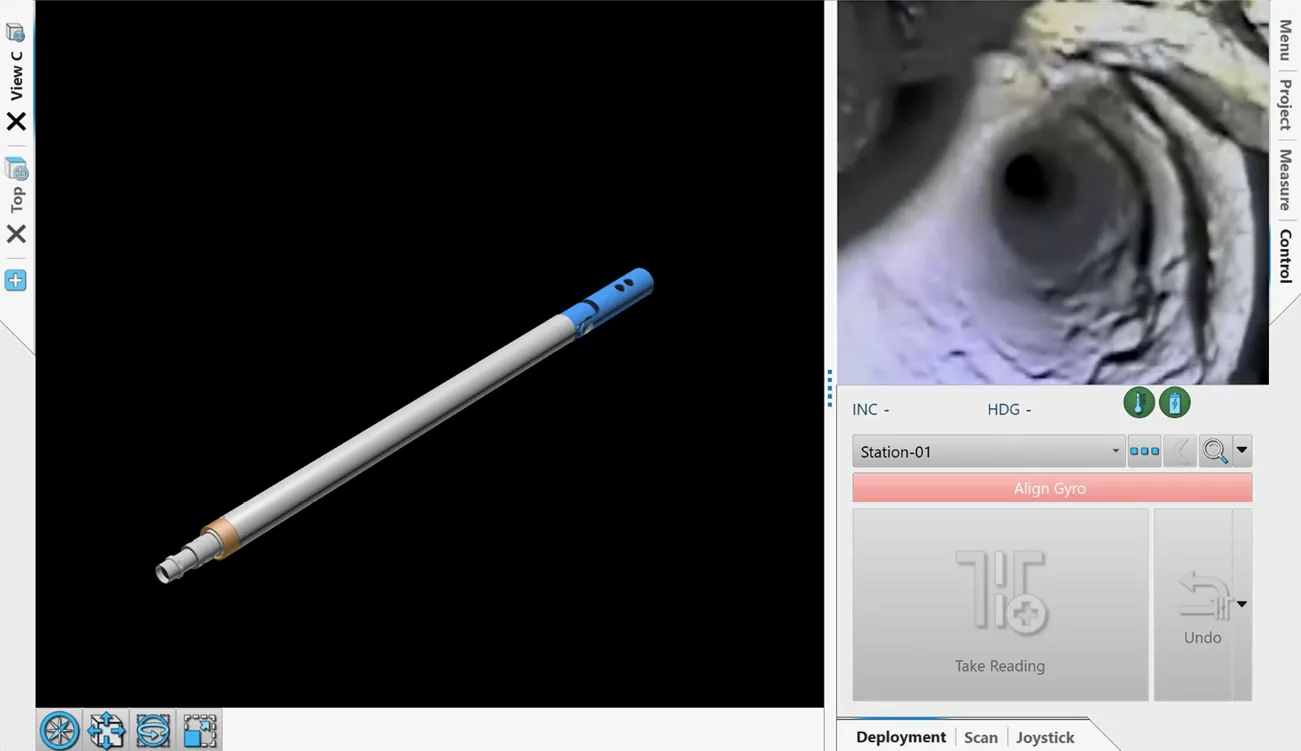
Core Capabilities
Broad Format Support
The module is compatible with nearly all industry-standard video and audio formats, including MP4, MOV, AVI, MKV, FLV, and WebM. Codec support includes H.264, HEVC, VP9, AV1, AAC, and others—ensuring smooth playback regardless of media origin.
Streaming And Network Sources
Stream media directly from URLs or local file systems with full support for HTTP, HTTPS, RTSP, and other network protocols. Live stream compatibility allows for real-time media playback in surveillance, conferencing, or broadcasting applications.
Precise Playback Control
Features include seek, pause, resume, speed adjustment, looping, and frame-accurate stepping—ideal for both casual viewing and technical inspection scenarios.
Audio-Video Synchronization
The module includes advanced AV sync logic to maintain tight coordination between sound and visuals, even in challenging conditions or with variable bitrates.
Hardware Accelerated Support
Where available, the playback engine utilizes GPU acceleration for decoding and rendering, resulting in lower CPU usage and enhanced performance, especially for high-resolution or multi-stream scenarios.
Custom Integration And Overlay
Videos can be rendered directly onto custom Qt widgets or OpenGL contexts, enabling overlays, augmented content, and multi-layer compositing—perfect for heads-up displays or interactive UI.
Subtitle And Captioning Support
Subtitle tracks (including embedded, external, and closed captions) are automatically detected and rendered with full timing and styling fidelity. Format compatibility includes SRT, ASS, WebVTT, and more.
Playback From Memory Or Encrypted Sources
Video data can be streamed from memory buffers or piped through decryption routines, allowing secure playback of protected content without requiring intermediate file writes.
Use Cases
- Embedded media inspection tools
- Secure video sharing with user-specific access controls
- Annotated training videos and instruction sets
- Real-time visual feedback in 3D environments
- Remote video stream analysis with integrated logs and telemetry
Modular By Design
The playback module is part of NDEVR’s modular architecture and can be embedded within any client or server-side component. Whether you’re building desktop applications, WASM-powered web tools, or secure client viewers, the video module can adapt to fit your workflow.
Supported Formats
Video Codecs
- MPEG-1, MPEG-2, MPEG-4 (Part 2)
- H.264 / AVC
- H.265 / HEVC
- VP8, VP9
- AV1
- Theora
- Dirac
- DV
- Sorenson
- MJPEG
- RealVideo (RV20, RV30, RV40)
- WMV 1/2/3 (Windows Media Video)
- QuickTime codecs (SVQ1, SVQ3)
- Cinepak
- Indeo Video
- Snow
Audio Codecs
- MP3 (MPEG Layer 1/2/3)
- AAC (Advanced Audio Coding)
- Vorbis
- Opus
- FLAC (Free Lossless Audio Codec)
- ALAC (Apple Lossless)
- WMA (Windows Media Audio)
- AC-3 (Dolby Digital)
- E-AC-3 (Dolby Digital Plus)
- DTS
- PCM (raw audio)
- ADPCM
- Speex
- RealAudio (RA)
- Musepack
Recommended Setups
Video Recording
To encode video and audio data efficiently for transmission over a network, you want a codec and container format that balances compression, quality, and latency.
H.264 (Video)
- Excellent quality at moderate file sizes
Ideal for long recordings without taking up excessive storage - Broad compatibility
Works seamlessly with NDEVR and most editing tools - Hardware-accelerated decoding
Enables efficient playback even on lower-power devices
AAC (Audio)
- Provides clear, high-quality audio even at low bitrates
- Works seamlessly with H.264 in all standard streaming pipelines
MP4 (Container)
- Modern, standardized file format
Compatible with NDEVR, mobile devices, browsers, and editors - Supports fast seeking and metadata embedding
- Ideal for both short clips and long-form video
Recording Guidelines
- Resolution: 1080p (1920×1080) for general use; 4K if fine detail is critical
- Framerate: 30 fps for standard usage, 60 fps for smooth motion (e.g., training, movement analysis)
- Bitrate: Aim for 5–10 Mbps for 1080p; higher for 4K or complex scenes
- Keyframe Interval: 2 seconds is optimal for balance between quality and seek performance
- Audio Sample Rate: 48 kHz for professional clarity
Network Streaming
To encode video and audio data efficiently for transmission over a network, you want a codec and container format that balances compression, quality, and latency. Ultimate recommendations largely depend on the speed and quality of the network, the desired latency, and the processing power of the video server.
H.264 (Video)
- Efficient compression delivers high-quality video with low bandwidth usage
- Smooth playback even on limited or variable Wi-Fi connections
AAC (Audio)
- Provides clear, high-quality audio even at low bitrates
- Works seamlessly with H.264 in all standard streaming pipelines
MPEG-TS (Container)
- Designed for live streaming over unreliable networks like Wi-Fi
- Tolerates packet loss better than other formats (like MP4)
- Compatible with most RTSP, RTP, and HLS stream sources
Configuration Tips
- Use a bitrate between 1–4 Mbps for 720p or 1080p video over standard Wi-Fi
- Enable hardware acceleration on the encoder if available
- Use keyframe intervals of 1–2 seconds for better seek and recovery
- Use UDP transport for lowest latency (when stability allows), or TCP for reliability
Photogrammetry
To capture footage that is optimal for 3D reconstruction and photogrammetry workflows within NDEVR, the recording format must prioritize image clarity, frame consistency, and minimal compression artifacts.
H.264 with High Bitrate or Intra-frame Codecs
- Use H.264 at very high bitrates (50+ Mbps) to reduce compression artifacts that can degrade 3D point cloud generation.
- For the highest quality, especially in controlled environments, use intra-frame codecs like Apple ProRes or DNxHR, which retain more detail across frames by avoiding inter-frame compression.
- Avoid variable frame rates; use constant frame rate for accurate frame indexing and alignment.
Container Format: MP4 or MOV
- MP4 is broadly supported and efficient for field capture and storage.
- MOV is preferred for professional workflows where frame-level accuracy and metadata preservation are more critical.
Configuration Tips
| Setting | Recommended Value |
|---|---|
| Resolution | 4K (3840×2160) or higher for fine detail |
| Framerate | 30 fps or more (avoid slow shutter blur) |
| Bitrate | ≥50 Mbps, constant if possible |
| Shutter Speed | Fast (1/120s or faster) to reduce motion blur |
| Color Profile | Neutral or log profile (if lighting is stable) |
| Lens | Fixed-focus wide-angle (minimal distortion) |
| Lighting | Even, diffuse, consistent across shots |